Batch OCR is useful when document work stops being a one-file task. You may have a folder of invoices, a set of scanned receipts, purchase orders from several vendors, or research PDFs that all need searchable text, tables, or Markdown output.
Many OCR tools solve this by uploading files to a cloud service. CoreParse is built for a different workflow: import multiple PDFs and images, keep them organized in local projects, run OCR on your Mac, then export the results when you are ready.
What batch OCR means
Batch OCR means processing more than one document in the same workflow. Instead of opening one PDF, running OCR, exporting, then repeating the same steps again, a batch OCR tool should help you:
- Import multiple PDFs or images at once
- Keep related files together
- Track which files have already been analyzed
- Review OCR output against the source page
- Export text, Markdown, or tables from more than one file
This is especially helpful for office documents, invoice OCR, receipt OCR, scanned PDF OCR, and any workflow where the same kind of document arrives repeatedly.
Import PDFs and images as a batch
CoreParse starts with local input. You can open PDFs or images from your Mac and group them into a project. A PDF page counts as a page to analyze, and an image counts as one page.
For users searching for “OCR multiple PDFs on Mac” or “bulk OCR images locally,” the important detail is that the source files do not need to be uploaded to a browser-based OCR workspace. The analysis runs on the Mac, so private documents can stay where they already are.
Manage batch OCR with projects
Projects keep related document sets together. You can create a project for invoices, receipts, purchase orders, research papers, client forms, or any other repeated OCR job.
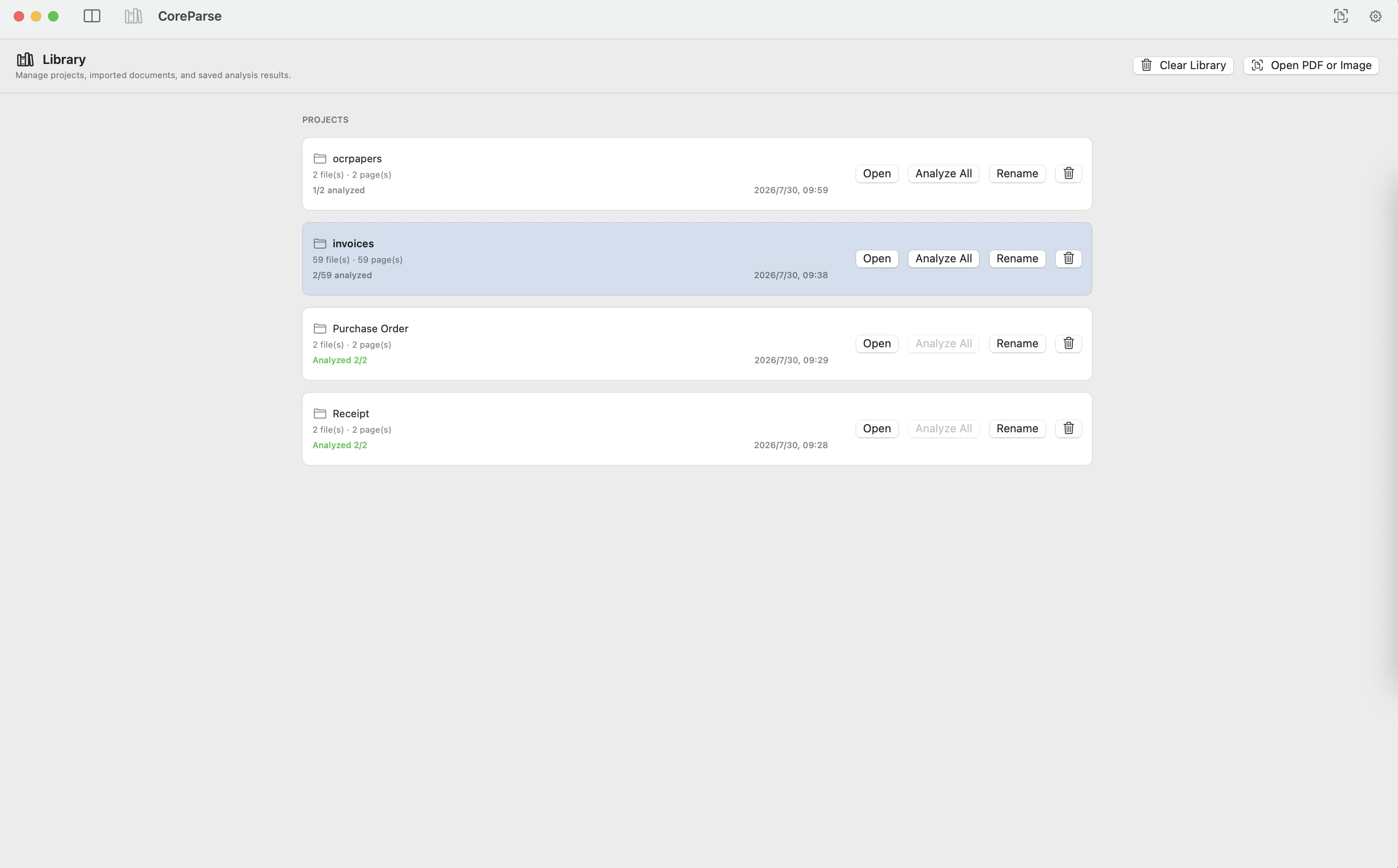
The project view makes batch work easier because you can see how many files and pages are inside each project, which documents have already been analyzed, and which sets still need work. When a project is selected, CoreParse can analyze all files in that project instead of forcing you to process every file manually.
Analyze multiple files locally
Batch OCR is not only about speed. For many users, the reason to run OCR locally is control. Invoices, receipts, contracts, financial statements, and internal reports may contain names, addresses, customer details, totals, or private business data.
With CoreParse, OCR, table extraction, and document analysis run locally on Mac. That makes the workflow a good fit when you need:
- Local OCR for private documents
- Batch PDF OCR without cloud upload
- Bulk OCR for scanned invoices or receipts
- A Mac OCR app for multiple files
- Table extraction from several PDFs in one project
After analysis, you can inspect the result beside the original page and decide what should be exported.
Batch export OCR results
Once files are analyzed, CoreParse can export from the current file or from all project files. This matters when the goal is not just “make this PDF searchable,” but to reuse the extracted structure in another tool.
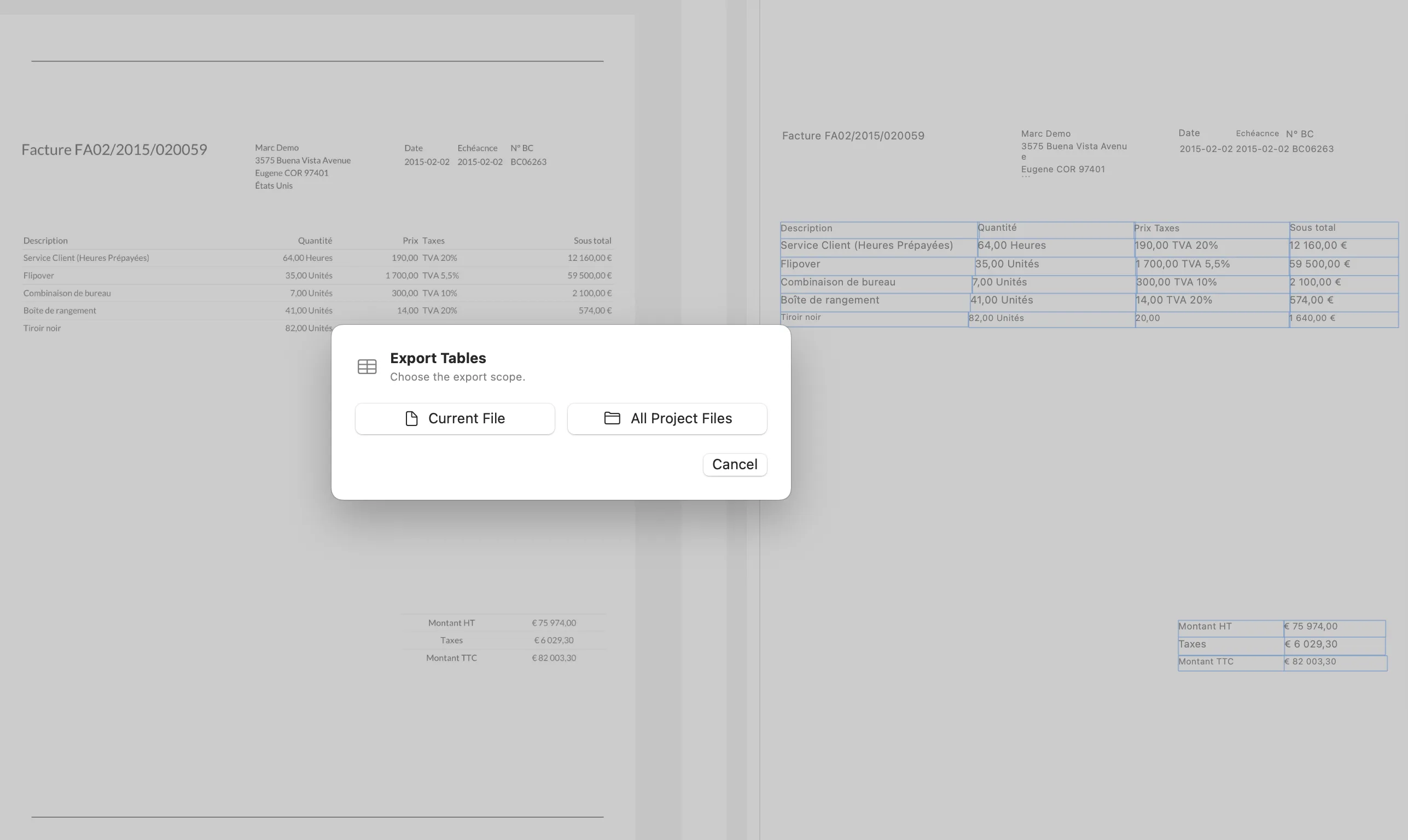
For example, an invoice project may contain dozens of PDFs. After running OCR and table detection, you can export tables from the whole project instead of repeating the same export action for every file. That makes CoreParse useful for local invoice OCR, bulk table extraction, and Markdown export workflows.
When local batch OCR is the right fit
Choose local batch OCR when you have many documents, but still want review and control before export. It is a good fit for:
- Invoices and purchase orders
- Receipts and expense records
- Scanned PDF archives
- Research PDFs and technical documents
- Client forms and internal reports
Cloud OCR can be useful for server pipelines and shared automation. Local batch OCR is better when the documents are sensitive, the workflow is Mac-based, or the output needs to be checked before it becomes Markdown, tables, or structured text.
CoreParse combines those pieces into one workflow: input a batch of PDFs or images, manage the files with projects, analyze them locally, then batch export the results from the current file or the whole project.